
From receipt to ERP

Expenses flow.
Your team moves forward.

Less time on expenses.
More room for what moves your company.

Corporate expense management with automated approvals, AI-assisted review and ERP integration. Configured for your business.

For companies of all sizes.
Set up for yours.
Acme & Co.OverviewML
Your financials are up to date.September ⌄
Expenses this month$48,720,00
Cumulative of the month
01 Sep.10 Sep.20 Sep.30 Sep.
Recent expensesSee all
Commercial travelCamila Santos$1,280.00Approved
HostingPedro Lima$840.00Analysis
Approved. Integrated. Solved.The ERP received the expense data.
A vision of what your operation might be.

An expense.
The whole process connected.

On the phone→In approval→In your ERP
See Expense Tree in action

An expense.
All on the same page.

Try the way of an expense. From the voucher to the ERP, each person follows what he needs to do.

INTERACTIVE DEMONSTRATION
Expense Tree / your company
YOUR DAY IN ORDER

Good morning, Marina. ✦

ML
Expenses this month$48,720.00A point-to-point view
To approve08Your team is on the move
Recent activityThis month
CS
Commercial travelCamila Santos · Commercial
$1,280Draft
PL
HostingPedro Lima · Projects
$840Done
AC
TransportAna Costa · Operations
$156Done
The next step begins with Camila.

Submit the expense using the phone beside you.

✓
9:41▮▮▮
‹My expense•••
RECEIPT ATTACHEDCommercial travel$1,280.00
Date
15 Sep.
Cost center
Commercial
Ready to send
123

Your receipt follows the expense at all stages.

↳ From your pocket to financial.

01 — Register. Proof and expense, together from the beginning.

Interface and illustrative data
Simple to sender
Context for those who approve
Visibility for those who manage
Every person at his pace

Work keeps moving.
Everyone stays in the loop.

A decision.
The next step happens.

The AI does a pre-analysis to signal possible inconsistencies and help prevent fraud before approval.

MC
Marina CostaCustomer visit · Commercial
Refund requested$184.90
Within the policy of this simulation
EXPENSE TREE · COLLABORATORWaiting for your decision

Marina follows the status by the app.
Proof attached

You did.
Followed the day.

The expense starts on the phone. The accompaniment too.

Know the app ↗

From approved to organized.

Cost, category and history center together on the way to the ERP.

Approval registeredOrganized dataSee integration ↗
Configured for your company

Your company.
Your rules.

Set up expense workflows around your company's policies. From approval levels to your app branding, every detail fits your operation.

Policies and approvalsRules, limits, and leg responsible.
Financial organisationCategories and cost centers of your operation.
Identity of the companyName and brand for a family experience.
Draw my company's flow
Try your rulesSIMULATION
Acme & Co.EXPENSE WORKFLOW
Collaborator→Manager→ERP

With this rule, $1,280.00 goes to the manager before reaching the ERP.

Integration with your ERP

Your ERP is part
of the same flow.

Connect expense management to your ERP. The finance team gets organized data and the context behind each expense.

Expense TreeApproved expense$1,280.00
Your ERPManagement systemReady to receive
Value$1,280.00
CategoryCommercial travel
Cost centerCommercial
ApprovalResponsible manager
Illustrative simulation. Integration is defined according to the ERP and the scope of its operation.
01

Less data entry

Avoid repeating the same releases on different systems.

02

More consistency

Light value, category and cost center in the same flow.

03

More traceability

Maintain the context of expenditure until financial integration.

Banks and cards, connected

More connections for
Your financial.

Integrations with banks and cards to monitor expenses in your operation.

BradescoSantanderAmerican ExpressVisaMastercard
& Webhooks APIs

Next step
It can be automatic.

Connect your systems and trigger other streams from Expense Tree events.

Approved expenseYour system
event · expense. approvedillustrative representation of an event
Made for your operation

Every expense has a context.
Your expense management should too.

MULTIPLE BRANCHES + PROJECTS

Multiple branches.
One connected view.

Manage different branches and register projects to organize the expenses of each initiative.

My organizationILLUSTRATIVE EXAMPLE
Unit costs$12,480.00Matrix
LINKED PROJECTAurora Project
↗
Subsidiary identifiedOrganized project
Each unit in its context.
Every project with its expenses.
MILEAGE EXPENSES

Driving your own car?
Turn the trip into an expense.

Register the kilometers traveled with your own vehicle in the company's expense process.

StartCustomer visit
Illustrative expense amount$50.40
Illustrative rate of $1.20/km. Your company sets the policy.
EXCHANGE RATES

Another currency.
A reference source.

Integration with the Central Bank of Brazil for exchange on foreign currency expenditure.

Where work happens

At work.
On the road.
In the palm of your hand.

The process follows those in motion. Register expenses, send proof and know what happens next.

  • Photos and files in the same place
  • Organized requests and reimbursements
  • Cellular review and approval
For employees and managers of companies using Expense Tree.
Expense Tree iOS & Android
9:41▮▮▮
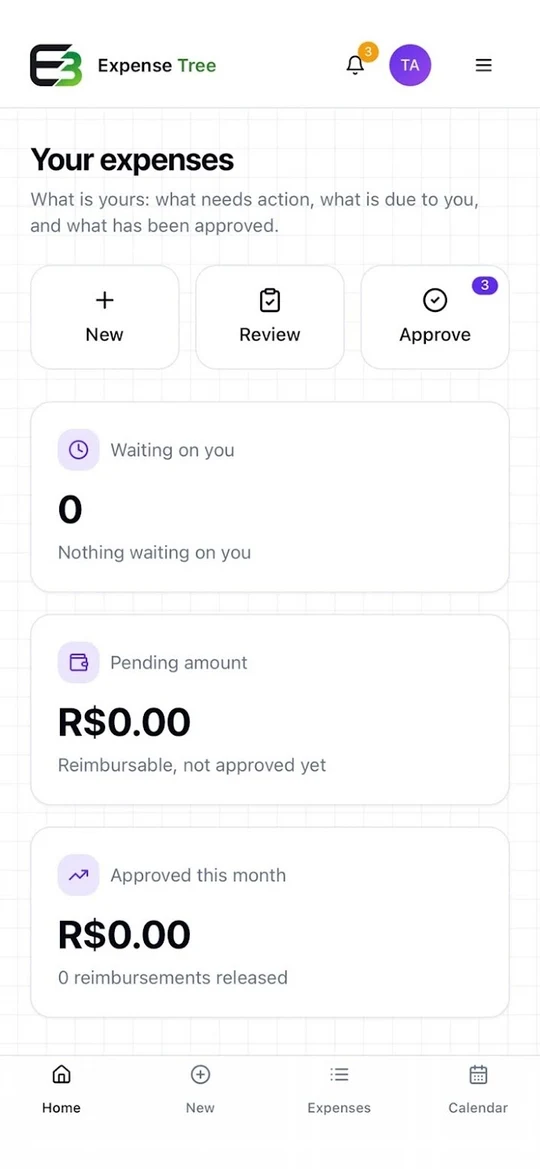
Official screen of Expense Tree with overview of expenses
Official captures published in Google Play
Expense Tree around the world

From São Paulo.
To the world.

Founded in São Paulo, Expense Tree is already used in eight countries: the United States, Mexico, Colombia, Spain, France, the United Kingdom, Poland and China.

From São Paulo to other marketsAMERICA · EUROPE · ASIA
Expense Tree: from São Paulo to eight countriesSão Paulo, Brazil, is the origin. Routes link São Paulo to the United States, Mexico, Colombia, Spain, France, the United Kingdom, Poland and China, where the product is already in use.
Origin · São PauloBrazil · Sao PauloWhere Expense Tree was founded

A platform.
Lots of places to go.

08countries with use
international
Before our conversation

Let's answer
your questions.

Talk to an expert
What size companies does Expense Tree serve?

Small, medium and large companies. In the conversation with our team, we understand your operation and draw the rules and the flow of approval into your context.

Can my company set its own rules?

Yeah. The configuration considers the company's policies, the limits, those responsible for approval and the organization of expenses. The design of the process is done according to your operation.

How does integration with ERP work?

Our team evaluates your management system, necessary information and integration flow. Thus, we set together the scope to connect the approved expenses to the ERP.

Does AI approve every expense?

The AI does a pre-analysis of expenses to signal possible irregularities before approval and help prevent fraud. The referral and decision follow the rules and those responsible for the company.

Can I access Expense Tree by downloading the app?

The application serves employees and managers of companies using Expense Tree. To bring the solution to your company, book a conversation on the form.

Let's talk.

More control.
Less manual work.

Tell us a little bit about your company and see how Expense Tree can connect expenses, approvals and ERP.

Ideas for the next step

Good ideas.
Less manual work.

Ideas to rethink expenses,
processes and your team's daily work.Explore the blog ↗